
Thinking of launching (or relaunching) your online store? Congrats, you're taking a fantastic step! But soon after the excitement kicks in, the big questions arise – and for many aspiring eCommerce entrepreneurs, one question looms larger than most: Should I build on Shopify or WooCommerce?
Knowing which platform is right for your needs, your business model, and your industry can be an overwhelming decision. That's why we've put together this detailed Shopify vs WooCommerce comparison for 2026—unbiased (as much as humanly possible), and based on real-world experience. We'll break down the key differences, pros and cons of each, and ultimately, hopefully, help you decide which platform is the perfect fit for your specific needs.
A quick intro about Metorik if you’re new here:
Metorik works hand-in-hand with eCommerce businesses built on either Shopify or WooCommerce. We see firsthand the incredible potential of each platform as our customers strive to understand their customers – ultimately helping to grow their businesses. We empower stores on both platforms with lightning-fast advanced reporting, analytics, data exporting and email marketing capabilities that go well beyond the basics.
A few of our team have worked for WordPress or WooCommerce in the past, and about half of us still run eCommerce businesses of our own. We live, breathe, and sweat eCommerce, so we feel we're uniquely positioned to offer an informed and practical comparison on these two platforms.
Key Takeaways: Shopify vs WooCommerce Comparison in 2026
Choose Shopify if you want an all-in-one hosted solution that's easy to set up and manage. Best for beginners, time-poor entrepreneurs, and those who prioritize simplicity over customization.
Choose WooCommerce if you need deep customization, full code access, or want to leverage WordPress for content marketing and SEO. Best for technical users, developers, and businesses with unique requirements.
Cost comparison: Shopify typically costs $50-75/month all-in, while WooCommerce can range from $20-50/month—but hidden costs like premium plugins and developer time can make WooCommerce more expensive for non-technical users.
The bottom line: There is no universally "better" platform—only the platform that better fits your specific business needs, technical comfort level, and growth plans.
Shopify vs WooCommerce: Quick Comparison at a Glance
Before we dive deep into each platform, here's a high-level comparison to help you quickly understand the key differences:
Feature | Shopify | WooCommerce |
|---|---|---|
Best For | Beginners, quick launches, hands-off approach | Customization, technical users, full control |
Setup Difficulty | ⭐ Easy (1-2 hours) | ⭐⭐⭐ Moderate-Hard (1-2 days) |
Starting Cost | $39/month + transaction fees | $0 plugin + $5-20/month hosting |
Typical Monthly Cost | $50-75/month | $20-50/month |
Customization | Limited (theme-based) | Unlimited (open-source) |
Technical Skills Required | None | Basic to intermediate |
Hosting & Security | Fully managed by Shopify | Your responsibility |
Support | 24/7 phone, email, live chat | Community-based, documentation |
Scalability | Excellent (automatic) | Good (requires management) |
SEO Capabilities | Good (basic tools) | Excellent (WordPress foundation) |
Payment Processing | Shopify Payments + third-party | Any third-party gateway |
Transaction Fees | 0.5-2% (if not using Shopify Payments) | None (just gateway fees) |
Apps/Plugins Available | ~8,000 curated apps | ~70,000+ plugins |
Ideal Store Size | Startups to enterprise | Small businesses to large stores |
Code Access | Limited | Full access |
Let's dive in and unravel the Shopify vs WooCommerce debate!
Shopify vs WooCommerce: Understanding the Key Differences Between These eCommerce Giants
Before we jump into the head-to-head battle, let's get a quick overview of each platform.
Shopify: The All-in-One Managed eCommerce Solution
Shopify is your fully hosted, all-in-one eCommerce platform. Think of it as renting a fully equipped store in a bustling shopping mall. Everything is taken care of – hosting, security, software updates – allowing you to bring your products, your style, and focus purely on selling.
Shopify’s key strengths: | Shopify can be ideal for: |
|---|---|
|
|
WooCommerce (Woo): The Customizable, Open-Source eCommerce Engine
WooCommerce, on the other hand, is a powerful, open-source eCommerce plugin for WordPress. Imagine it as building your store from the ground up on your own land. You have complete control and customization options, but you also handle more of the technical aspects.
WooCommerce’s key strengths: | WooCommerce can be ideal for: |
|---|---|
|
|
Shopify vs WooCommerce: Feature-by-Feature Comparison
Now, let's get down to the nitty-gritty. We'll compare Shopify and WooCommerce across key categories to help you see where each platform truly shines.
🚀 Ease of Use & Setup
Shopify Setup 🏆 | WooCommerce Setup |
|---|---|
Setting up a Shopify store is incredibly straightforward. Shopify takes care of all the foundations. The drag-and-drop interface is intuitive, and there’s fewer choices that need to be made. The setup wizard guides you through each step and you can have a basic store live in a couple of hours. | WooCommerce first requires you to decide between self hosting on your own third-party web hosting plan (wordpress.org) – where you’ll then need to install and set up a WordPress installation. Or, you take advantage of wordpress.com, which is a paid service hosting your WordPress website which comes with WordPress installed “out of the box”. Either way, you’ll then need to install and set up the WooCommerce plugin, find and configure a suitable theme, and then install further plugins for security, backups, and to give you the commerce functionality you need for your business. WooCommerce has a far steeper initial learning curve for absolute beginners. Whilst an experienced technical person could set up a WooCommerce site in a few hours, it’s going to take at least a day or two for beginners. |
💵 Cost & Pricing
Shopify | WooCommerce 🏆 | |
|---|---|---|
Overview | Shopify uses a tiered monthly subscription model (Basic, Shopify, Advanced, and Plus for enterprise). There is no free plan. | The WooCommerce plugin itself is free, however, you'll need to pay for your web hosting if you go the WordPress.org route. Web hosting ideal for WooCommerce ranges from $5-20 per month for smaller stores, all the way up to $200 per month for really high volume stores. |
Transaction Fees | The cheaper monthly plans, Basic ($39pm), have higher transaction fees when using Shopify’s payment gateway (2.9% + $0.30) and a higher surcharge (2%) when using third-party payment gateways. Whereas the more expensive monthly plans, Advanced ($399pm), have lower transaction fees: 2.5% + $0.30 for Shopify’s payment gateway, and 0.6% for third-party payment gateways. There are also other features and benefits from the higher plans, but we won’t cover those here. | With WooCommerce you connect your own third-party payment gateway/s such as Stripe, PayPal, or WooPay (WooCommerce’s own payment gateway). The fees for these vary quite a lot depending on your country, but most card payment gateways range from 1.5 - 3% + $0.30. Payment Gateways links: |
Theme Costs | There is a good selection of free themes on Shopify, although for high-performance stores you’ll probably want a paid theme. These typically range from $50 all the way up to $300 (one off cost) | WooCommerce has hundreds, probably thousands, of free themes available. However we’d always suggest using a high-quality paid theme as poorly built themes can make your site really slow and cause issues. Paid themes range from $20 up to $100. This can be a one-off cost, or you can often pay annually for ongoing support. |
Extension Costs | For many stores, you won’t need any other Apps to get started, however if you do, these typically range from $10 to $50 per month. | It’s typical to see WooCommerce stores with 20 or 30 plugins installed to add various functionality. There are a lot of free plugins, but paid plugins generally are better built, causing fewer issues, and often come with support. Traditionally, WordPress plugins were one-off or annual subscriptions, however we’re seeing more and more move to monthly subscriptions. |
Total expected costs | So, whilst you theoretically can get started for $0 upfront and about $40 per month (excluding transaction fees), in reality, expect to spend around $200 up front, and more like $50-75 per month (also excluding transaction fees). | If you already have web hosting, you can get started with WooCommerce for $0 upfront costs (excluding transaction fees), however in reality expect to pay around $50-100 up front, and approximately $20-50 per month on-going. |
Metorik’s take: WooCommerce is often thought to be the lower cost platform compared to Shopify, and whilst it certainly can be, it’s certainly not always the case. What you can save in dollars up-front by leveraging free or cheap themes and plugins, you often end up spending in time, dealing with unexpected bugs and incompatibilities. Whilst keeping control of your costs is really important for any business, it should not be the only factor you base your decision on when it comes to choosing Shopify or WooCommerce.
🧰 Features & Functionality
Shopify’s In-Built Functionality 🏆 | WooCommerce’s In-Built Functionality |
|---|---|
Shopify boasts a strong set of built-in features, including products, variations, and inventory management, order processing, in-built marketing tools, and solid core reporting. For most Shopify stores, you may only need a few apps to meet your requirements. For advanced functionality, it is possible to build things yourself, but for the vast majority you’ll rely on the Shopify App Store to integrate with third-party tools and to enhance the functionality of your store. | The core WooCommerce plugin provides only the essential eCommerce features. For most stores, you’ll quickly need to install a handful of plugins to get the “commerce” functionality you need. From there, you can find plugins for almost anything you can think of – customer learning management systems, selling products by the pound or foot, setting up a wholesale store with different pricing for different users, and much more. For most WooCommerce stores, you’ll probably need at-least a handful of plugins, with most stores we see having 20-30 plugins. |
Metorik’s take: Both platforms offer solid core features, however Shopify edges out WooCommerce here with the least reliance on extensions to create the commerce experience you require.
One area where both WooCommerce and Shopify stores can benefit from extensions is for deep-diving into your analytics, reviewing advanced reporting, and creating highly-customizable email marketing automations.
This is where Metorik significantly elevates both Shopify and WooCommerce beyond their native capabilities. Metorik enables you to go beyond basic sales reports to truly understanding your customer’s buying behavior, segmenting your audience based on almost anything you can think of, and automating personalized email flows that drive repurchasing and customer loyalty – all within a lightning fast platform.
Regardless of whether you choose Shopify or WooCommerce, make sure to take advantage of Metorik’s 30-Day free trial to get deeper insights and fill-in the missing components of your store!
🛠️ Customization & Flexibility
Shopify’s Customizability | WooCommerce’s Customizability 🏆 |
|---|---|
Shopify offers theme-based customization. You can choose from a wide range of themes and customize them through a visual editor, or with some basic code editing. The level of customization is somewhat limited compared to WooCommerce, which can be both a good thing and a bad thing. The Shopify App Store provides further customization options through apps, though it’s mostly up to the app and theme developers to make things work together. Whilst sufficient for most stores, customization is more controlled within Shopify's ecosystem, and this is by design. Shopify positions itself as taking on more of the responsibility, so store owners can focus on selling. | WooCommerce, being open-source and built on WordPress, offers unparalleled customization. You have full control over the code, design, and functionality. With almost endless themes, plugins, and custom code, the only limit is your technical ability. For people experienced with WordPress, this level of customizability is a blessing, and we regularly see incredibly unique eCommerce experiences, however, for those just getting started in eCommerce, the level of customizability in WooCommerce can create unwanted issues, confusion, and a poor experience for both the store owner and their customers. |
Metorik’s take: We often see smaller, newer eCommerce stores get lost in creating a completely customized shopping experience with WooCommerce, when, for the majority of stores, they would be better off spending their time on sales and marketing.
If a custom shopping experience is a key part of your business model, then WooCommerce is probably the winner in this department, however if it’s not, the simplicity and guard-rails of Shopify will help you stay focused on what really matters… sales.
📈 Scalability & Growth
Shopify’s Scalability 🏆 | WooCommerce’s Scalability |
|---|---|
Shopify is built for scalability. Its hosted infrastructure can handle significant unexpected traffic spikes and growth. For most stores built on Shopify, they won’t need to think about scalability again until they’re in the multi-million level of revenue. Upgrading to higher-tier Shopify plans (especially Shopify Plus) provides access to even more resources and enterprise-level features for really large, high volume stores. | WooCommerce scalability depends heavily on your hosting and server setup, as well as how well you’ve built your WooCommerce store. While WooCommerce can scale to handle large volumes of orders, it requires a very proactive management of your infrastructure, and potentially in-house technical expertise (web developers) to optimize for performance as you grow. |
Metoriks’ take: When it comes to scalability, Shopify is the clear winner for businesses that don’t have in-house technical capabilities, or don’t need the customizability that WooCommerce offers.
However, as your store grows and you have the finances to be able to pay for in-house web developers, you may be in a position to extract benefit from a more customizable experience that WooCommerce can offer.
It’s not unusual to see stores start on WooCommerce to take advantage of the cheaper initial running costs, then switch to Shopify once they have a certain level of success – and the platform costs become less of a concern – so they can focus more on sales and marketing. Then, after they’ve reached a great level of success and have fine tuned their business model, they may switch back to WooCommerce as they’re in a position to extract a lot of value from tiny opportunities that come from the customization that’s on offer with WooCommerce.
🔎 SEO (Search Engine Optimization)
Shopify for SEO | WooCommerce for SEO 🏆 |
|---|---|
Shopify provides very basic SEO tools that allow you to set the meta title and description, however customization past here is very limited and there are no in-built bulk edit tools. These limitations can make it time consuming and difficult to manage meta information if you have hundreds or thousands of products. | Leveraging the power of WordPress’ blogging engine, WooCommerce is inherently SEO-friendly. WordPress is renowned for its SEO capabilities, and the feature set out-of-the-box is noticeably more powerful than Shopify’s, but it truly shines after you install one of the many (free and paid) SEO plugins that allow for proper schema markup, bulk editing, and conditional setting of meta information. |
Metorik’s take: Strong SEO is vital for driving organic traffic to your store so being able to set, manage, and measure your store’s SEO performance is incredibly important. WooCommerce really takes the lead here when it comes to the tools on offer, but either way you go, it’s the keyword strategy, content, and optimization that matters, and both platforms do allow for this.
🛟 Support: Help when you need it
Shopify’s Support 🏆 | WooCommerce’s Support |
|---|---|
Shopify offers a range of customer support options, with 24/7 assistance via phone, email, and live chat. They have a support team readily available to help with technical issues, platform questions, and guidance on using Shopify features. This robust support system can be a significant advantage for users, especially beginners, who may need assistance navigating the platform and resolving issues quickly. | Support for WooCommerce is primarily community-based. You'll find extensive documentation, community forums, and online resources where you can often find answers to common questions. Direct, immediate support like Shopify's is not included with WooCommerce as the plugin itself is entirely free. You may also be able to get support from your hosting provider for server-related issues, and potentially from developers of premium themes and plugins you use. This reliance on community and documentation means users need to be more self-reliant or willing to seek out solutions independently. |
Metorik’s take: Unless you’re a web developer with experience with WordPress, if platform support is an important component in your decision making, then Shopify is probably the best route for you. There is a wealth of knowledge publicly available for WooCommerce, however with the open source nature and endless combinations of plugins, hosting, and themes, finding answers relevant to your specific needs can sometimes be tricky.
🔐 Platform Security
Shopify’s Security 🏆 | WooCommerce’s Security |
|---|---|
Shopify handles your store’s security for you. As a fully hosted solution, Shopify takes care of server security, PCI compliance, SSL certificates, and software updates. This takes the burden off store owners to manage these critical security aspects resulting in a secure environment for both your business and your customers. | Security in WooCommerce is primarily the store owner's responsibility (or that of their developer/hosting provider). While the core of WordPress and WooCommerce are generally secure, maintaining a secure WooCommerce store requires additional plugins and a proactive approach. This starts by selecting a secure hosting provider, regularly updating WordPress, WooCommerce, themes, and plugins, implementing security plugins such as Wordfence and/or Cloudflare, and ensuring PCI compliance if you handle credit card data directly. While WooCommerce is not inherently insecure, it requires a lot more work and technical understanding to ensure a secure store. |
Metorik’s take: Whilst the additional effort required to set up and maintain a secure store using WooCommerce isn’t immaterial, it shouldn’t be the deciding factor alone on which route you take. There are plenty of guides available on maintaining a secure WooCommerce site, and CDN services such as Cloudflare can (at a price) help to increase the security of your store.
🔌 App Store/Plugin Ecosystem
Shopify’s EcoSystem | WooCommerce’s EcoSystem |
|---|---|
Shopify takes a page from Apple with a curated app store of generally high-quality apps that extend functionality in a number of different ways. Shopify apps are generally monthly subscriptions and can be costly if you end up needing a few, so choosing the right ones is crucial. Being a curated app store, Shopify apps tend to be of a high-quality and generally free from bugs or security vulnerabilities so store owners can have confidence trying out different options. | WooCommerce benefits from the huge WordPress plugin repository with an estimate of 70,000+ plugins available. These plugins range from providing huge functionality enhancements, to simple one-small-issue plugins. However, being an open market, there are unscrupulous actors out there, so extra care must be taken when installing plugins to ensure they have been sourced from reputable providers or platforms such as Code Canyon or the official WooCommerce directory. |
Metorik’s take: Both platforms have a strong third-party ecosystem so for most stores you’ll be able to create the functionality you need in either Shopify or WooCommerce. If you have a more unique business that requires (or can benefit from) a tailor-made shopping experience, then WooCommerce will make this a lot easier to create than on Shopify.
Many third-party services (such as Metorik) have a Shopify App and a WooCommerce Plugin to ensure they work perfectly on both platforms. If you have any mission-critical integrations, check with your providers first before choosing a platform.
The last factor to be mindful of is the tendency for WooCommerce-based stores to end up with so many plugins installed that your site becomes slow and buggy. Whilst you don’t need to install a lot of plugins to create a great store on WooCommerce it’s easy to get carried away, so be honest with yourself about if and how that extra plugin is going to enhance one of your business KPIs.
Shopify vs WooCommerce: Pros and Cons Summary
Shopify Pros and Cons
👍 Shopify Pros | 👎 Shopify Cons |
|---|---|
|
|
WooCommerce Pros and Cons
👍 WooCommerce Pros | 👎 WooCommerce Cons |
|---|---|
|
|
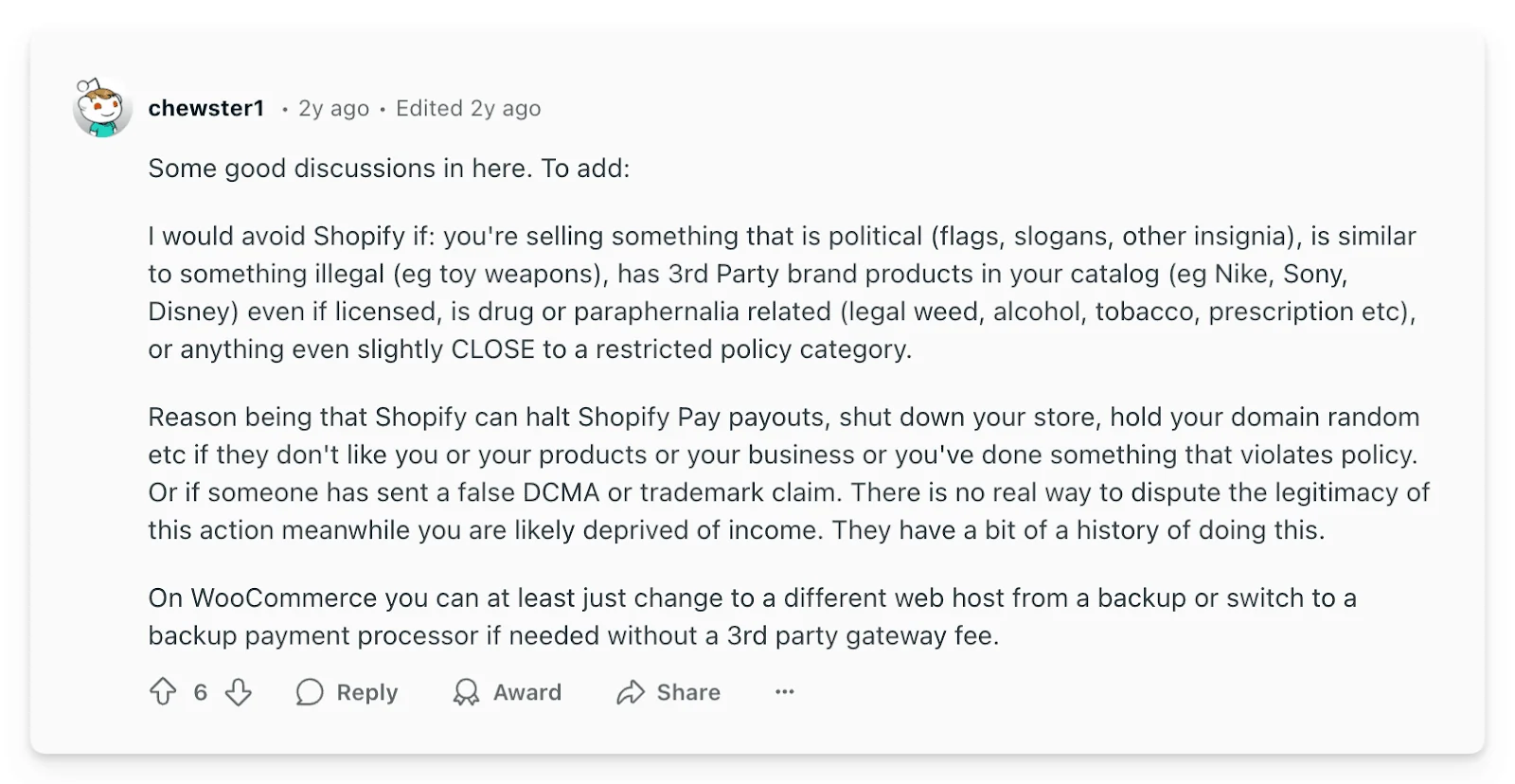
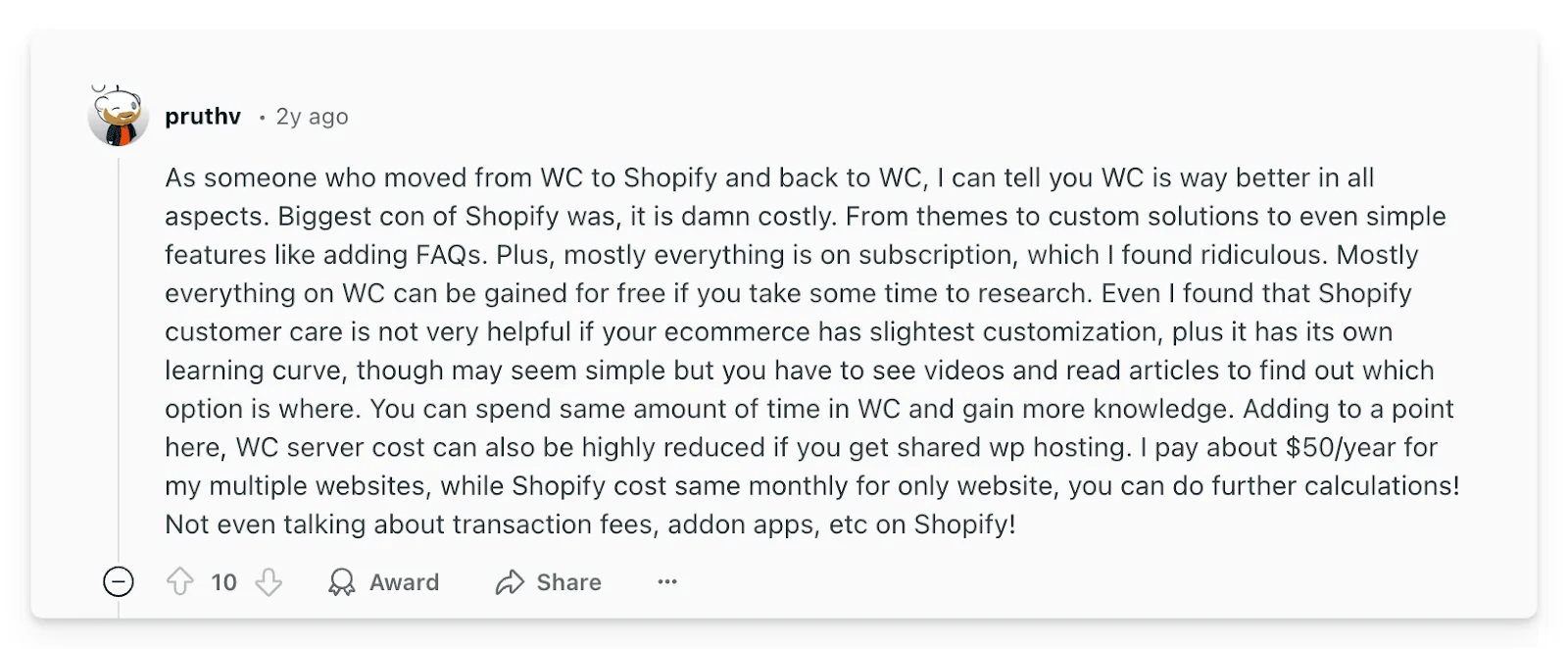
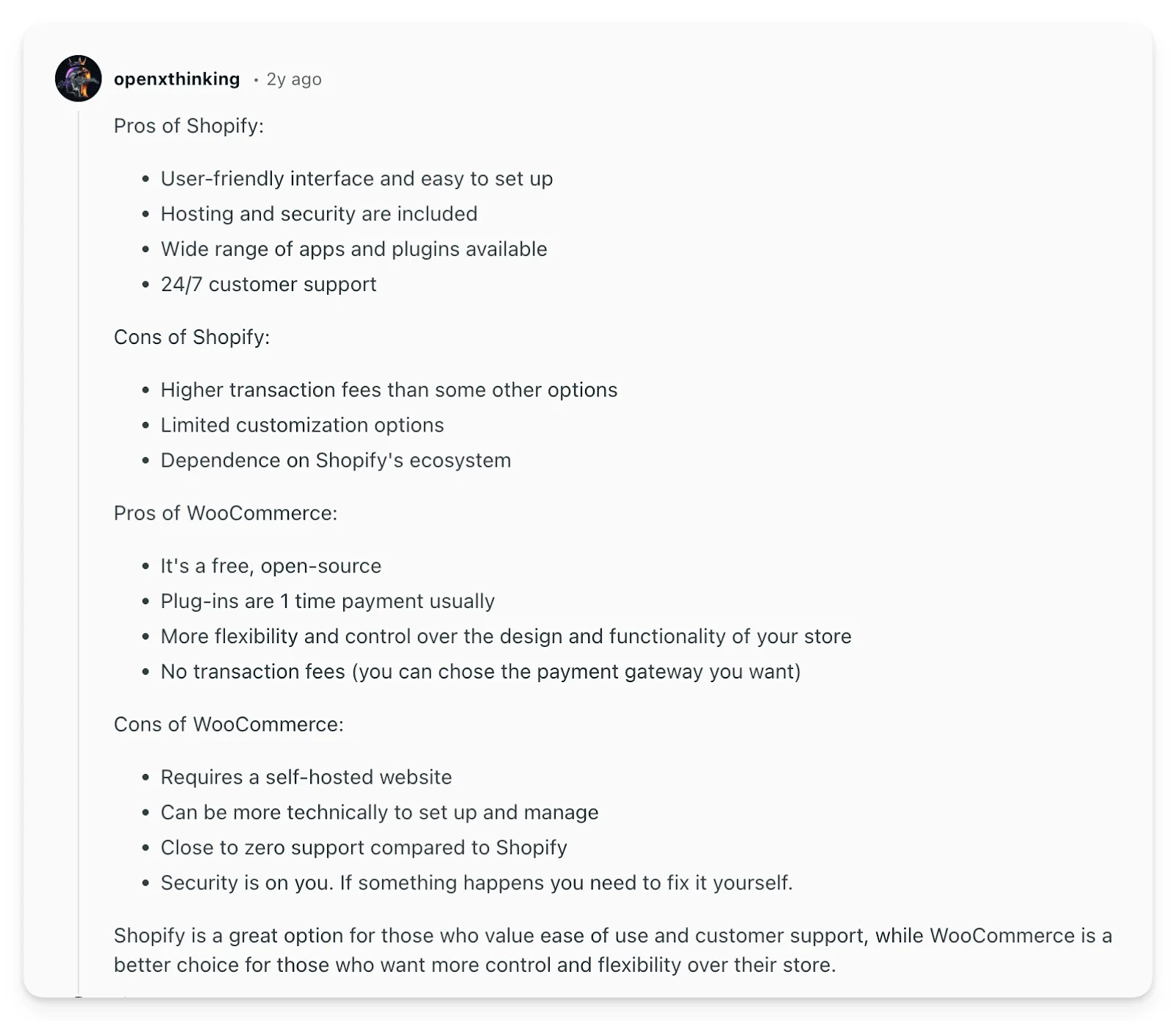
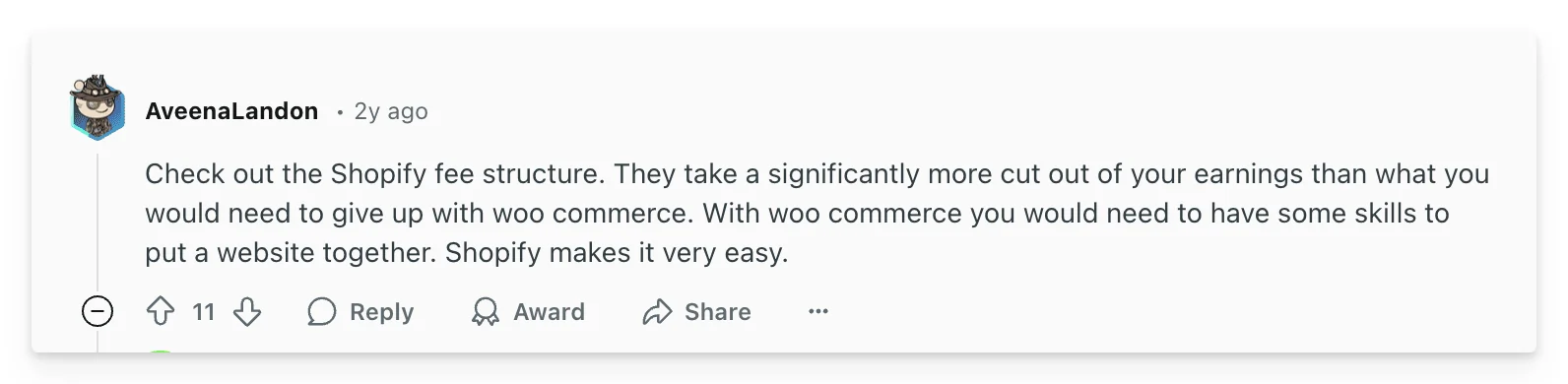
What are people saying about Shopify vs WooCommerce on Reddit?
You’ve no-doubt read a few articles on this topic by now (including ours) and possibly heard conflicting opinions. We took a look at the internet’s favourite knowledge base (no not Wikipedia), to see what the wisdom of Reddit had to say on the topic:
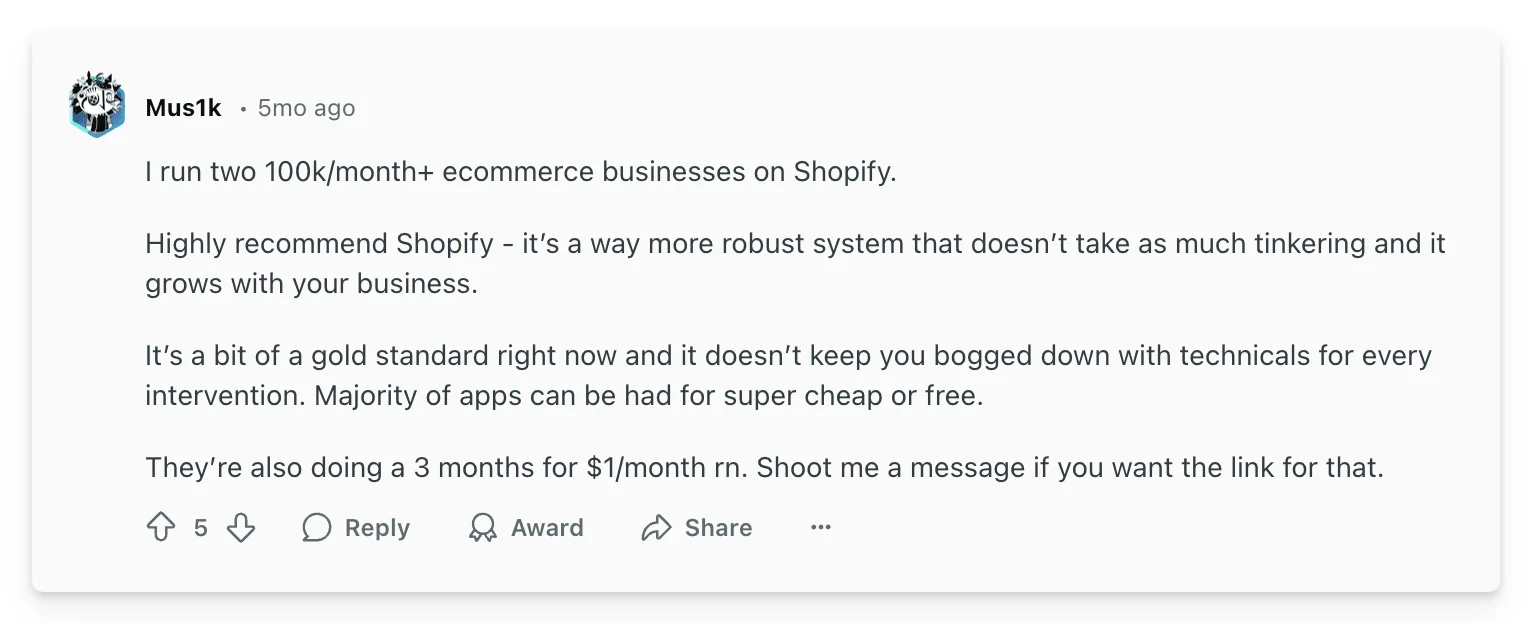
Some people have strong feelings about Shopify:
And some for WooCommerce:
And some more neutral opinions:
Shopify vs WooCommerce: Which Platform Should You Choose?
The "best" platform isn't universal – it depends entirely on your specific needs and priorities. Here's a quick guide:
It can be a tricky thing choosing the right platform. You can always change after launch, but the significant upfront workload (on either platform) means that you’ll likely stick with your selection for the first couple of years at-least.
Choose Shopify if:
| Choose WooCommerce if:
|
Level Up Your eCommerce Game, Regardless of Your Choice
No matter which platform you choose – Shopify or WooCommerce – understanding your store's performance and customer behavior is absolutely crucial for sustainable growth. That's where tools like Metorik come into play.
Metorik seamlessly integrates with both Shopify and WooCommerce to provide a unified dashboard packed with powerful features that go far beyond basic analytics:
Unlock Deeper Insights with Advanced Reporting: Go beyond standard reports and access cohort analysis, RFM segmentation, lifetime value calculations, and much more. Understand your customer lifecycle and identify key trends driving your business.
Supercharge Your Email Marketing Automation: Create highly personalized email flows based on customer behavior, purchase history, and segmentation. Drive increased customer engagement, recover abandoned carts, and boost sales with targeted email campaigns.
Save Time and Make Data-Driven Decisions: Stop relying on guesswork. Metorik empowers you to make informed decisions based on real-time data, saving you time and maximizing your ROI on either Shopify or WooCommerce.
Frequently Asked Questions: Shopify vs WooCommerce
Is Shopify or WooCommerce better for beginners?
Shopify is significantly better for beginners. It requires no technical knowledge, handles all hosting and security automatically, and you can have a store live within hours. WooCommerce requires you to set up WordPress, configure hosting, install plugins, and manage technical aspects like security and backups – making it much more challenging for someone without technical experience.
Which is cheaper: Shopify or WooCommerce?
It depends on your needs and technical ability. WooCommerce can be cheaper upfront ($0 for the plugin + $5-20/month for hosting), totaling around $20-50/month. Shopify starts at $39/month but can cost $50-75/month when you add apps and transaction fees. However, WooCommerce's "free" plugin often requires paid themes, plugins, and potentially developer help, which can make it more expensive long-term. For most small businesses, the total cost ends up being similar, but Shopify's predictable monthly fee is easier to budget.
Can I migrate from WooCommerce to Shopify (or vice versa)?
Yes, migration is possible but requires planning. Both platforms offer migration tools and apps (like LitExtension, Cart2Cart) that can transfer products, customers, and order history. However, custom functionality, specific plugins/apps, and design elements won't transfer automatically. Expect to invest time in redesigning your store and potentially rebuilding custom features. For stores with complex customizations, consider hiring a developer to ensure a smooth transition.
Which platform is better for SEO?
WooCommerce has stronger SEO capabilities thanks to WordPress's powerful content management system and SEO plugins like Yoast, RankMath, and All in One SEO. It offers more granular control over URLs, meta tags, schema markup, and content structure. Shopify provides basic SEO tools that work well for most stores, but has limitations in URL customization and lacks the advanced SEO plugin ecosystem that WordPress offers. For businesses where organic traffic is a primary growth channel, WooCommerce's SEO advantage is significant.
Do I need coding skills for Shopify or WooCommerce?
Shopify requires zero coding skills – you can build and run a successful store using only the visual editor and pre-built themes. WooCommerce doesn't require coding for basic stores, but having HTML/CSS knowledge helps with customization. For advanced customizations on either platform, coding skills (or hiring a developer) become valuable, but they're optional for standard eCommerce functionality.
Which platform is more scalable for growing businesses?
Shopify offers easier, more automatic scalability. As your traffic and sales grow, Shopify's infrastructure handles the increased load without you needing to upgrade servers or optimize performance. WooCommerce can scale to handle high-volume stores, but it requires proactive hosting upgrades, performance optimization, and potentially developer expertise. Large, successful stores exist on both platforms, but Shopify removes the technical burden of scaling.
Can I sell on multiple channels with Shopify and WooCommerce?
Both platforms support multi-channel selling, but Shopify has a slight edge with built-in integrations. Shopify natively connects to Facebook, Instagram, Amazon, eBay, TikTok, and offers a POS system for retail. WooCommerce also supports these channels through plugins and extensions, giving you similar functionality but requiring more setup and configuration. If omnichannel selling is central to your strategy, evaluate which platform's specific integrations best match your target channels.
What about dropshipping – which platform is better?
Both platforms work well for dropshipping. Shopify has popular apps like Oberlo (now Shopify Marketplace), DSers, and Spocket that make dropshipping straightforward. WooCommerce offers similar functionality through plugins like AliDropship and WooDropship. The choice comes down to your technical comfort level: Shopify's plug-and-play approach is easier for dropshipping beginners, while WooCommerce offers more control over pricing, margins, and automation for experienced dropshippers.
Conclusion: The Final Verdict on Shopify vs WooCommerce in 2026
Both Shopify and WooCommerce are exceptional eCommerce platforms, each with its own strengths and ideal use cases. There's no single "winner" – the best choice is the one that aligns perfectly with your business goals, technical comfort level, and long-term vision.
Our verdict for 2026: If you're launching your first online store and want to focus on selling rather than technical management, Shopify is the safer, faster choice. If you're technically inclined, need extensive customization, or plan to heavily invest in content marketing and SEO, WooCommerce offers more flexibility and control. Both platforms power successful multi-million dollar businesses—your success will ultimately depend on your products, marketing, and customer experience, not the platform itself.
By carefully considering your needs and leveraging powerful tools like Metorik to understand your data and optimize your customer experience, you'll be well-equipped to build a thriving and successful online store, regardless of the platform you choose.