
If you want to know whether AppLovin Ads is actually making you money, you need three things:
clean click tracking into your store
a post-purchase survey to catch what click attribution misses, and
your daily AppLovin spend sitting in a profit report next to your revenue and costs.
The Axon dashboard helps a little with the first two. It doesn't do the third at all.
In January a merchant on r/ecommerce asked a question we've since heard from a lot of store owners:
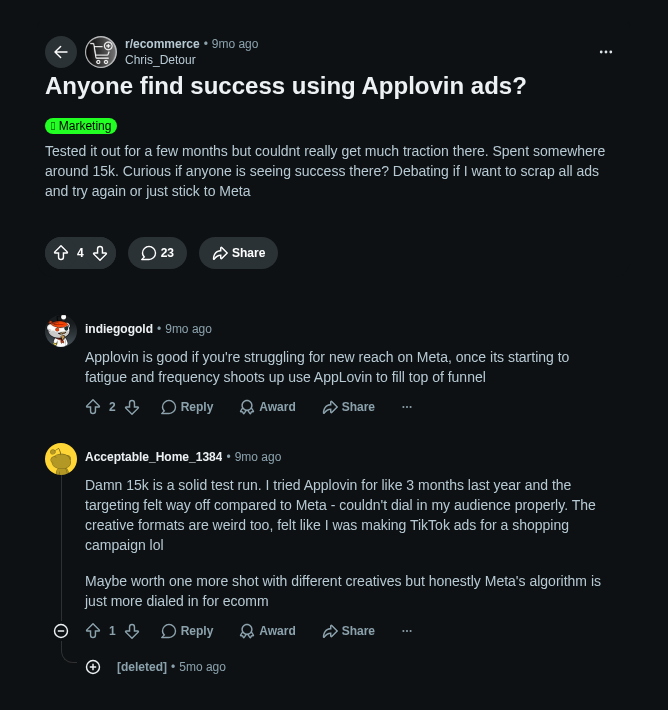
The thread picked up 23 replies over five months. Two were real. The other 21 were auto-removed by the subreddit's low-karma filter (most of them agency pitches judging by the timing). So a real (and important) question got two answers, and no way to check either against the merchant's own numbers.
Since AppLovin opened Axon Ads Manager to everyone on 2 July 2026 (no referral code, no spend gate), that question has become common, and Google searches for "applovin ads" have more than doubled since spring.
In this post we’ll outline;
what the channel is
why its own dashboard can't tell you whether it's profitable
what the public benchmarks say side by side, and
the checklist we'd use to get a real answer on a Shopify or WooCommerce store.
What is AppLovin (Axon) advertising?
AppLovin sells full-screen video ads inside mobile games, reaching what it says is over a billion daily active users. Their bidding engine is called Axon, and since their 2026 rebrand the advertiser product is Axon Ads Manager. Ads are usually vertical video with an interactive end card, and brands often reuse creative they already run on Meta and TikTok.
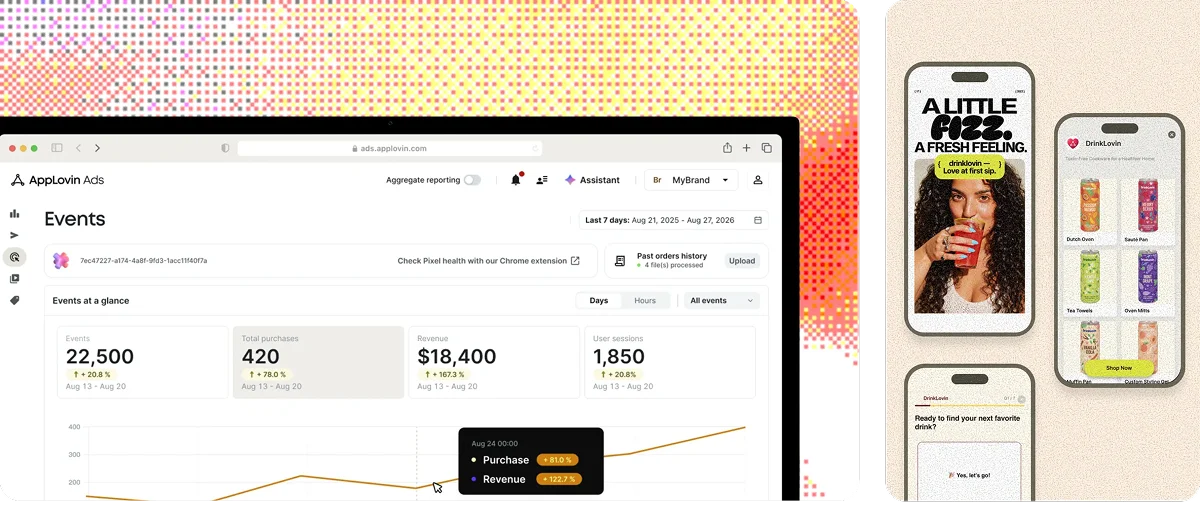
For an online store it works like this:
Shopify stores install the official AppLovin app. It connects your Axon account, installs a web pixel and a theme extension for attribution, and syncs your product catalog for dynamic product ads.
WooCommerce has no AppLovin plugin. You add the pixel through GTM or a pixel-manager plugin, or use a server-side connector such as Converge. Either way, the
aleidandalartparameters AppLovin appends to your URLs have to survive any redirects, or attribution quietly breaks.
According to Digital Position's guide, in late 2024, closed beta was limited to brands spending around $600k a month on Meta, with a $10k credit to test. From there through to the first half of 2026 it was referral-only. On 2 July 2026 it opened to everyone, according to Common Thread Collective.
As for who it suits, Fairing's post-purchase survey data has food, beverage and supplements well ahead, health and beauty next, and apparel lagging. Sweat Pants Agency describes the audience as 55–60% female and mostly aged 35–55.
Why AppLovin is harder to measure than Meta
Nobody would call Meta's attribution transparent, and AppLovin is still harder to read, for five reasons.
1. Click-only attribution
Axon reports on a 0-day or 7-day click window. There's no view-through credit by default, though an optional mode adds a 1-day view.
On paper that's more conservative than Meta's 7-day click plus 1-day view. In practice, full-screen game ads generate a lot of accidental taps, and every accidental tap opens a 7-day window in which any purchase gets credited to AppLovin.
Causality Engine's attribution guide puts it well: click-only is conservative relative to Meta, not causally valid.
2. Three numbers for one campaign
The same spend produces a different ROAS depending on which tool you ask.
Causality Engine's example is a supplement brand adding €20,000 a month on AppLovin:
The Axon dashboard reported €80,000 in 7-day-click revenue, a 4.0 ROAS.
After removing overlap with Meta, that became €52,000 and a 2.6.
After causal attribution, €28,000 and a 1.4.
At a 60% gross margin, a causal 1.4 ROAS is a profit-on-ad-spend of 0.84.
The brand was losing money on the campaign its dashboard said was its best.
It can run the other way too. WorkMagic's Axon incrementality report, covering 100-plus DTC brands, found Axon's incremental ROAS averaged about 12% higher than last-click attribution reported, and 67% of brands were being under-credited by their attribution platform.
Smart Marketer saw the same thing from the other side: AppLovin "might look lower inside its own dashboard, but stronger inside Triple Whale."
Whichever way the error runs, no attribution number from any of these tools tells you whether the channel made money. Your store's profit does.
3. Event-based tracking versus session-based stores
Axon's pixel is event-based and Shopify's reporting is session-based, and Sweat Pants Agency notes the two "can mismatch." Attribuly's tracking guide reports pixel-only match rates of 60–85%, with 24–72 hours before the figures fully reconcile. So even your attributed revenue is an estimate, and a late one.
4. Budget velocity
The complaint we saw most often was how fast the money goes.
"Axon blew my entire budget in under an hour." – a merchant on r/FacebookAds, April 2026
"Platform blew through entire budget in a matter of one hour. Support admits that their platform is 'volatile' in the beginning." – Shopify App Store review, October 2025
Fast spend isn't necessarily wasted spend.
Around 80% of AppLovin conversions land within the first hour of the click, according to both Sweat Pants Agency and Zipify.
The problem is combining hour-one spend with attribution that takes up to three days to settle.
You can't tell burn from buying until the money is gone, unless same-day spend is sitting next to same-day profit.
5. Your spend lives inside Axon
AppLovin does expose cost data. Its advertiser Reporting API returns cost, sales, roas and new-customer columns by day, campaign, creative set and country.
Two catches. It's a rolling 90-day window, so anything older than three months is gone unless you exported it. And nothing in Shopify or WooCommerce consumes it; Attribuly's setup guide is explicit that there's no automated cost sync into your store.
Your revenue is in one system, your spend in another with a 90-day memory, and your profit isn't in either.
What's a good ROAS on AppLovin?
Every public benchmark we could find comes from someone with a stake in the answer, so here they are with quotes on both sides.
Zipify, whose founder's agency runs the campaigns it reports on, describes a brand at $70,000–$80,000 a day holding a 1.8x ROAS with 84% net-new customers. The r/ecommerce merchant above spent around $15,000 over several months and "couldn’t really get much traction."
Isaac Reyna, a media buyer posting on X in April 2026: "Axon is holding its own against Meta. ROAS is virtually identical. 76% of Axon purchases are net new customers… Axon drove 600+ orders in the 14 day window." Another merchant in that same r/ecommerce thread: "the targeting felt way off compared to Meta - couldn't dial in my audience properly."
AppLovin's own case study of haircare brand Kitsch, citing Northbeam data on X in August 2026, reports new-customer ROAS improved 50.1% while AppLovin spend grew 3.4x year over year. A Shopify App Store reviewer in September 2026: "Spent $300 so far with 0 conversions."
Zach Stuck of Homestead, quoted in DTC Times, scaled the Hollow brand from $1,500 to $12,000 a day in November 2024 at daily ROAS between 1.85x and 2.69x.
Read together, AppLovin seems to work at a certain scale and mostly hasn't worked for anyone below that scale.
A media buyer on r/facebookadsexperts put the floor bluntly: "I audited an account and they told me ther CPA is 55 and they had a budget of $50 LOL."
Sweat Pants Agency says the algorithm needs roughly ten conversions a day to engage, and Common Thread suggests brands should already be spending over $50,000 a month on paid social before testing.
If your daily budget is less than ten times your target cost per purchase, the benchmarks above probably don't apply to you. This means if your target CAC is $50, you’ll need a daily budget of at least $500.
And keep the supplement brand in mind: a 4.0x in the dashboard was a 1.4x in reality, and a 1.4x at 60% margin loses money. The ROAS worth tracking is new-customer ROAS, after margin.
Why ROAS alone will mislead you
ROAS is revenue divided by spend. It ignores what that revenue cost you to deliver. Profit on ad spend, or POAS, is gross profit divided by spend, and it's the number that decides whether a channel stays in the mix.
A 2.0 ROAS is excellent at 70% margin and a disaster at 30%.
AppLovin makes this more acute in two ways:
It's a new-customer channel (76–85% net-new across the sources above), so first-order margin understates lifetime value.
And the ads lift sales in places your store never sees: WorkMagic found that on top of what AppLovin drove on brands' own sites, it drove roughly another 26% in sales on Amazon and Walmart, none of which shows up in Shopify or WooCommerce.
Both are reasons to judge the channel over a month, on what's actually left after product, shipping and ad costs, rather than on a dashboard ROAS you refresh every hour.
The AppLovin profitability checklist for Shopify and WooCommerce
Tag every destination URL. Attribuly recommends
clickid={EVENT_ID}&utm_source=applovin&utm_medium=cpc&utm_campaign={CAMPAIGN_NAME}&utm_content={CREATIVE_SET_ID}. Make surealeidandalartpass through any redirect chain, per AppLovin's own docs.Get the pixel firing on purchases. On Shopify, install the AppLovin app, choose "Connect existing account", enable the theme extension, and confirm both the web pixel and theme extension show Active. On WooCommerce, use GTM, a pixel-manager plugin, or server-side. Validate with AppLovin's Pixel Helper before spending.
Add a "mobile game ad" option to your post-purchase survey. Fairing found only 13% of game-ad-driven conversions show up in last-click reporting, with 74% misattributed to other channels. The survey is the cheapest way to see the rest.
Compare 0-day and 7-day click revenue. Digital Position found most AppLovin purchases happen within 24 hours, so the two should be close. A big gap usually means accidental clicks are inflating the 7-day number.
Sync your daily AppLovin spend into your store's profit reporting. This is the step most people skip, and the one that turns four attributed-revenue estimates into a single profit figure. More on this below.
Cap hard for the first two weeks. Set daily limits you can afford to lose, and resist frequent bid changes; Digital Position reports a 48-hour relearning period after each one.
Judge on a 30-day window. That's Common Thread's advice and ours: new-customer cost per acquisition and POAS over a month, rather than ROAS over an afternoon.
Metorik now syncs AppLovin spend automatically
Metorik already pulls daily ad spend from Meta, Google, TikTok, Pinterest, Snapchat, Reddit, Microsoft and ChatGPT Ads into your profit reports. AppLovin now joins that list.
To connect it, open Axon Ads Manager, go to your account settings, choose Keys, and copy your Report Key. In Metorik, head to Integrations, click Connect on the AppLovin Ads card, and paste the key in. The full steps are in the help article.
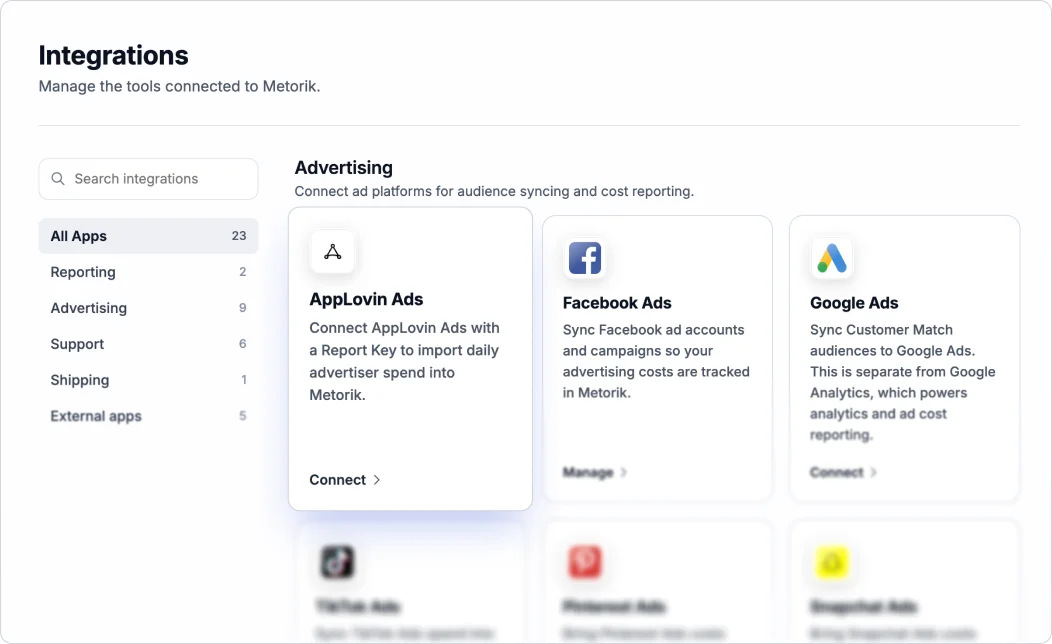
From then on Metorik fetches new AppLovin costs every 15 minutes and backfills the previous 90 days. The 90-day limit is AppLovin's Reporting API window rather than ours, and it's a good reason to connect on day one of a test rather than day sixty, since anything older can't be recovered.
Your AppLovin spend then shows up in Metorik's Profit report and Costs dashboard alongside every other channel, so you're looking at net profit after AppLovin rather than revenue attributed to it.
Blended ROAS, POAS and new-customer profit are calculated for you, and every profit figure in your reports and scheduled digests already includes the spend.
It works the same way for Shopify and WooCommerce, which matters most on the WooCommerce side, where there's no AppLovin plugin at all and you don't need one to get the profit picture.
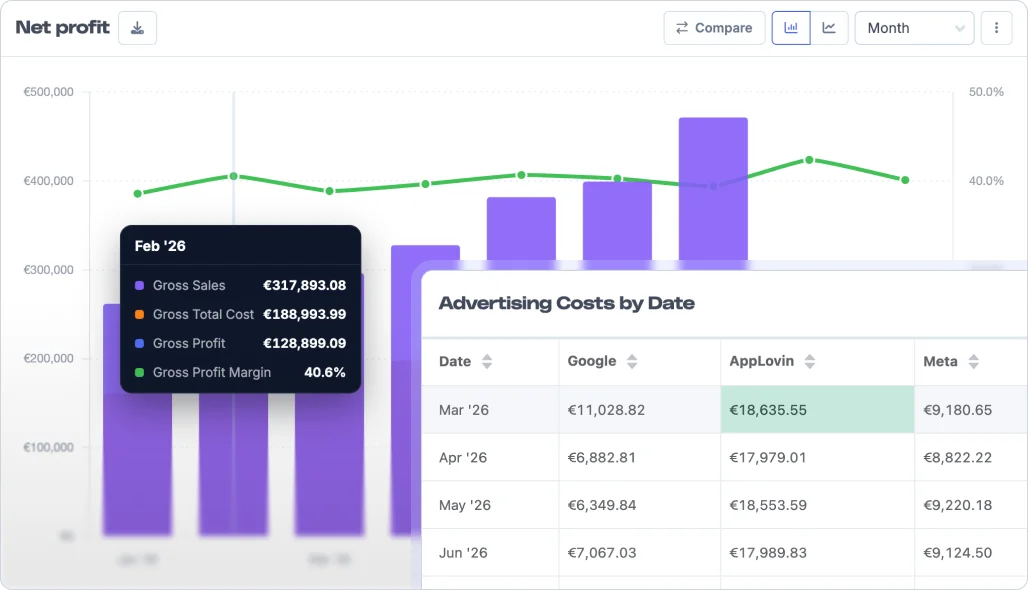
If you'd like to see this with your own store's data, start a free 30-day trial. Your last 90 days of AppLovin spend will be in your profit report within minutes of connecting.
For the same approach applied to another new channel, see our guide to tracking ROAS for ChatGPT Ads.